

Description
Turn visitor photos into a gallery worth exploring. Picture Gallery adds picture posts, searchable image listings, frontend uploads and a My Pictures workspace to WordPress. Use it for creator portfolios, community photo submissions, member galleries, event pictures or visual collections alongside your videos and live channels.
Visitors can browse a compact grid, open pictures in a full-screen PhotoSwipe viewer, or read more in picture cards. Contributors can upload and edit their own pictures from the frontend. You control who can upload, who can publish directly and which submissions need review.
Start with community uploads or a portfolio from your existing Media Library using the setup guide. Keep original attachments and copy their titles, captions and alternative text into independent Picture posts. Repeat imports safely without overwriting later Picture edits.
The gallery, viewer and image editor are included free. Image processing runs on your WordPress hosting using its available image editor; no external editor account or image-processing subscription is required.
Make your pictures easy to discover
- Native gallery block: add a gallery in the WordPress editor, select existing Pictures or import Media Library images, and reorder your selection without writing a shortcode.
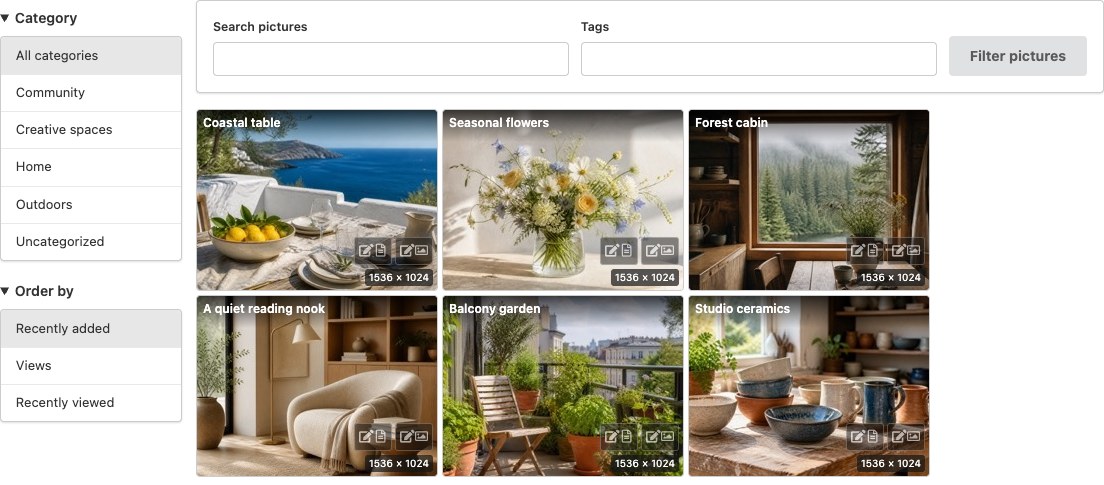
- Three distinct layouts: Styled Tiles for a compact traditional gallery, a dense Responsive grid and Picture cards with titles and descriptions.
- Menu or dropdown filters: let visitors search by name or tags, select a category and sort pictures. Each listing can use its own layout and filters.
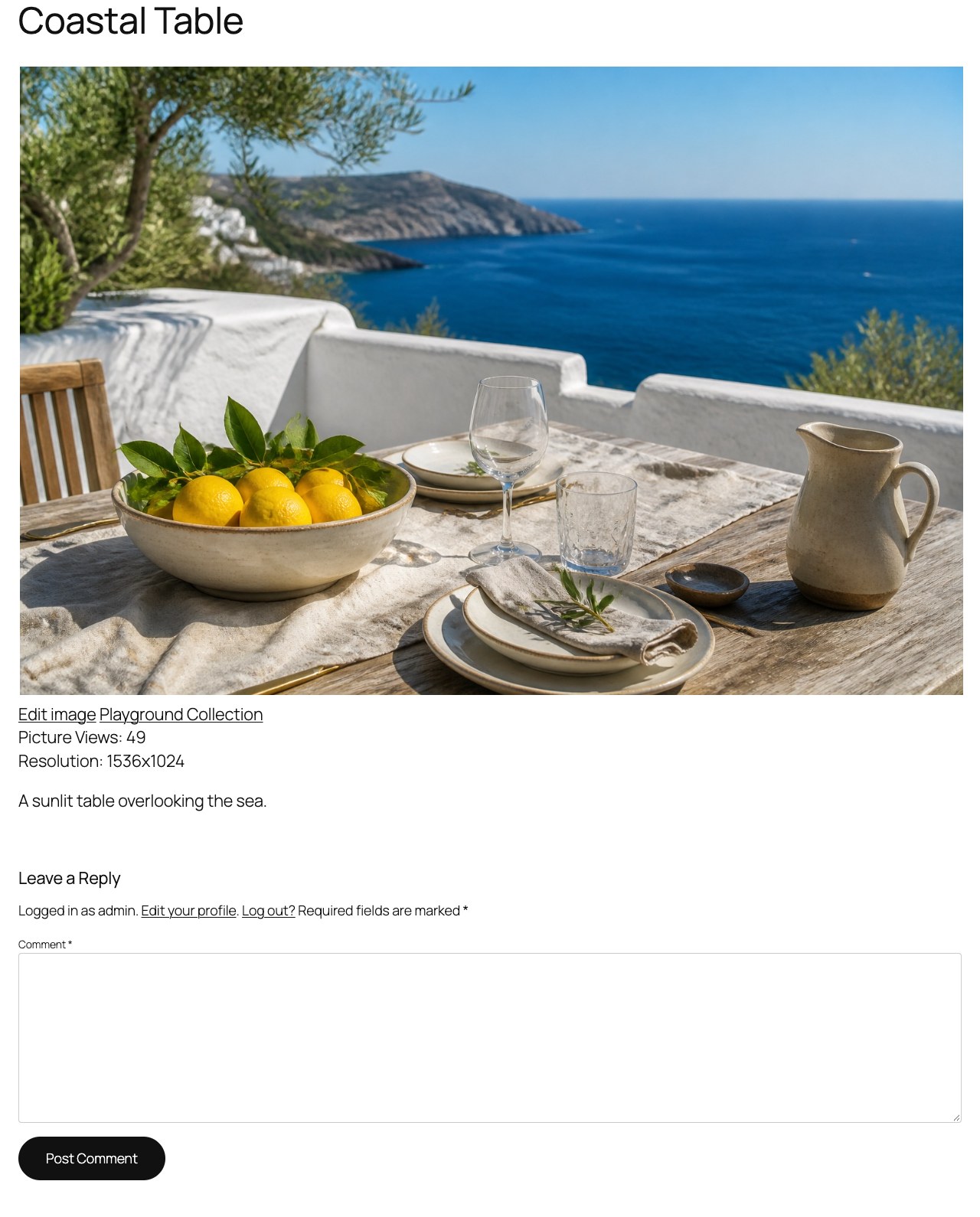
- PhotoSwipe browsing: zoom, swipe and move through authorized nearby pictures, with larger previous/next previews, an optional thumbnail strip and a visible button to open the picture post.
- Clean presentation: thumbnail-aware sizing, small resolution labels, subtle hover effects and matching management buttons. FansPaysite light/dark mode and palette changes apply without reloading.
- Useful without JavaScript: grid/cards and PhotoSwipe-enabled tiles start with real images, picture-post links and page navigation; enhancement adds AJAX filtering and the viewer.
Let contributors manage their pictures
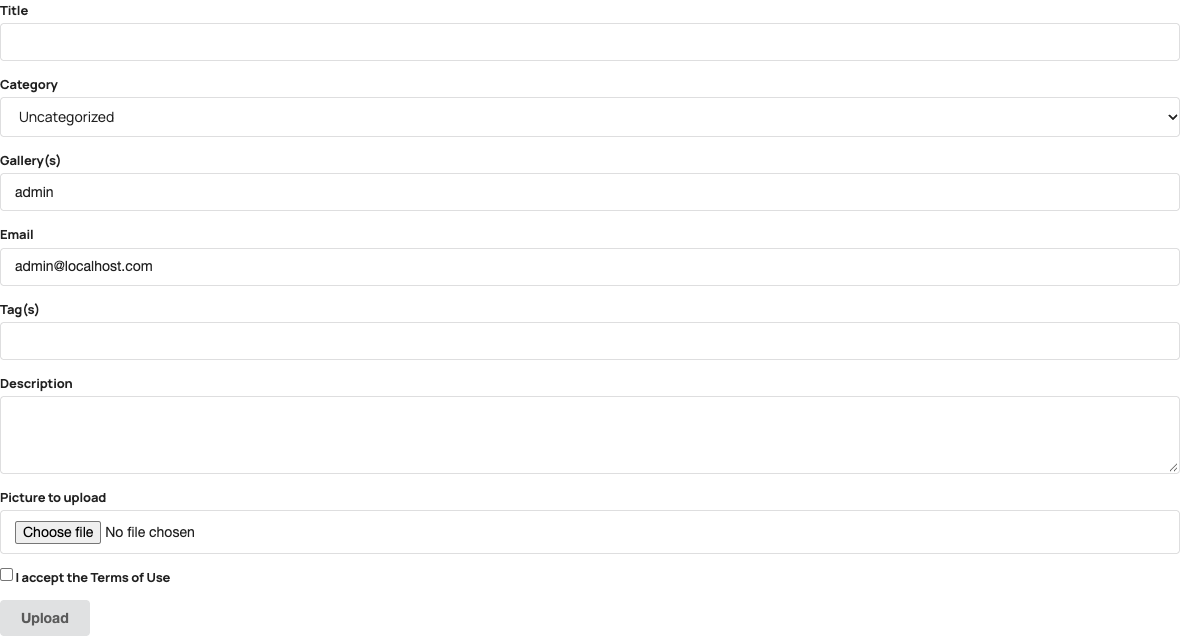
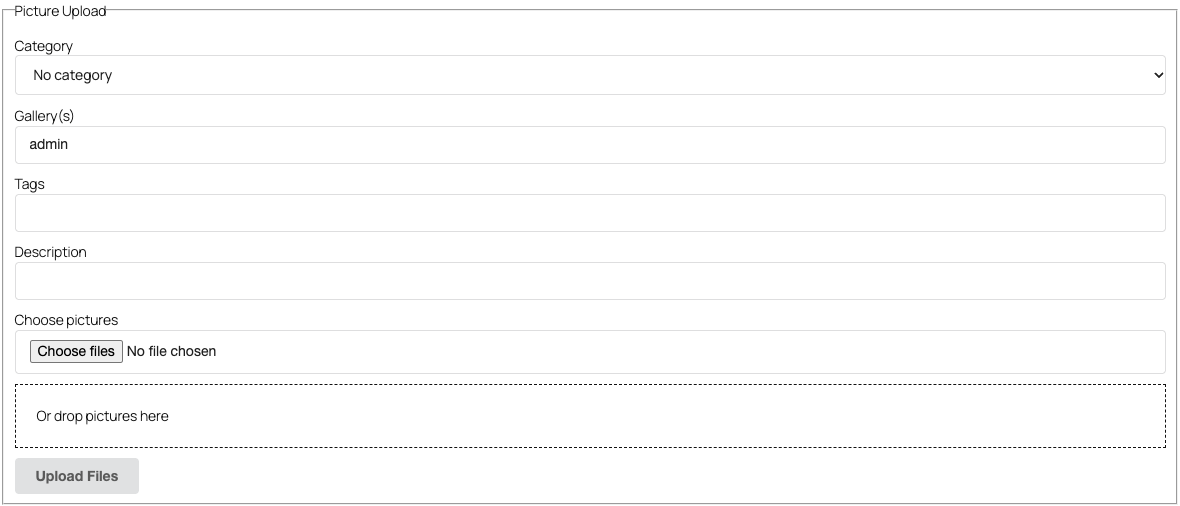
- Frontend uploads: select multiple JPG, PNG or GIF pictures, or drag and drop them onto the member uploader. Compatible mobile browsers can choose camera or photo-library images.
- My Pictures: give each logged-in contributor a personal workspace for images, titles, captions, descriptions, alternative text and existing categories/tags. Review submissions before changing public content.
- Simple image tools: choose Crop, Resize, Rotate or Flip, then expand just that tool’s controls. Preview changes, undo/redo and save without opening the dashboard. JPEG and PNG editing is supported.
- Review and restore: edits can await approval while the existing public image remains available. Restore original composition creates a fresh generation; the original and normalized master are retained.
- Guest contributions: optional guest upload form with moderation, rate limits, notification email and optional Google reCAPTCHA v3.
Practical tools for site owners
- A clearer first setup: choose community uploads or a Media Library portfolio, preview the three layouts and find your gallery pages quickly.
- Reuse existing images: import selected Media Library images with optional initial titles, captions and alternative text, while retaining original files and later Picture edits.
- Optional AI-agent inspection: on WordPress 6.9+, let authenticated tools find authorized pictures missing alternative text or captions and inspect their current details. Read-only abilities cannot change content or files; no AI service is bundled or required.
- Eight included interface languages: Spanish (es_ES), Brazilian Portuguese (pt_BR), French (fr_FR), Dutch (nl_NL), German (de_DE), Arabic (ar), Italian (it_IT) and Romanian (ro_RO), including the block editor and frontend tools.
- Picture posts with gallery taxonomy, categories, tags and WordPress Media Library integration.
- Role-based upload/publish rules and gallery access settings.
- EXIF orientation correction and WordPress image-editor thumbnail generation, with bounded processing checks.
- Automatic queued refresh when displayed thumbnails no longer match configured sizes, plus a bounded administrator thumbnail tool.
- On-demand import of existing Picture Gallery media relationships when pictures are listed, viewed or edited; existing posts, authors and URLs are preserved.
- Durable upload identities, upload journal inspection and pending-only recovery after interrupted requests.
- Image Edit Journals for inspected save recovery and explicit cleanup of proven unused edit files after a retention period.
- Conservative shared-media checks and retention by default, including after deactivation or uninstall.
Extend your community
Optional integrations add more ways to use your gallery:
- MicroPayments / FansPaysite adds content monetization and frontend content management. Picture Gallery checks supported membership and purchase entitlements before including images in its modern galleries/viewer.
- Rate Star Review adds star ratings and provider-controlled likes/votes to all three listing layouts.
- Video Share VOD and Broadcast Live Video complement pictures with recorded or live video.
- Paid VideoChat integrates pictures with performer profiles.
These integrations are optional. Publicly reachable image files are not protected downloads: restricting gallery access does not make an existing public file URL private.
Picture Gallery is provided by VideoWhisper. For optional installation help, custom development or suitable hosting, contact VideoWhisper. No service purchase is required for the included gallery and editing features. If the plugin helps your website, share your experience.
Screenshots
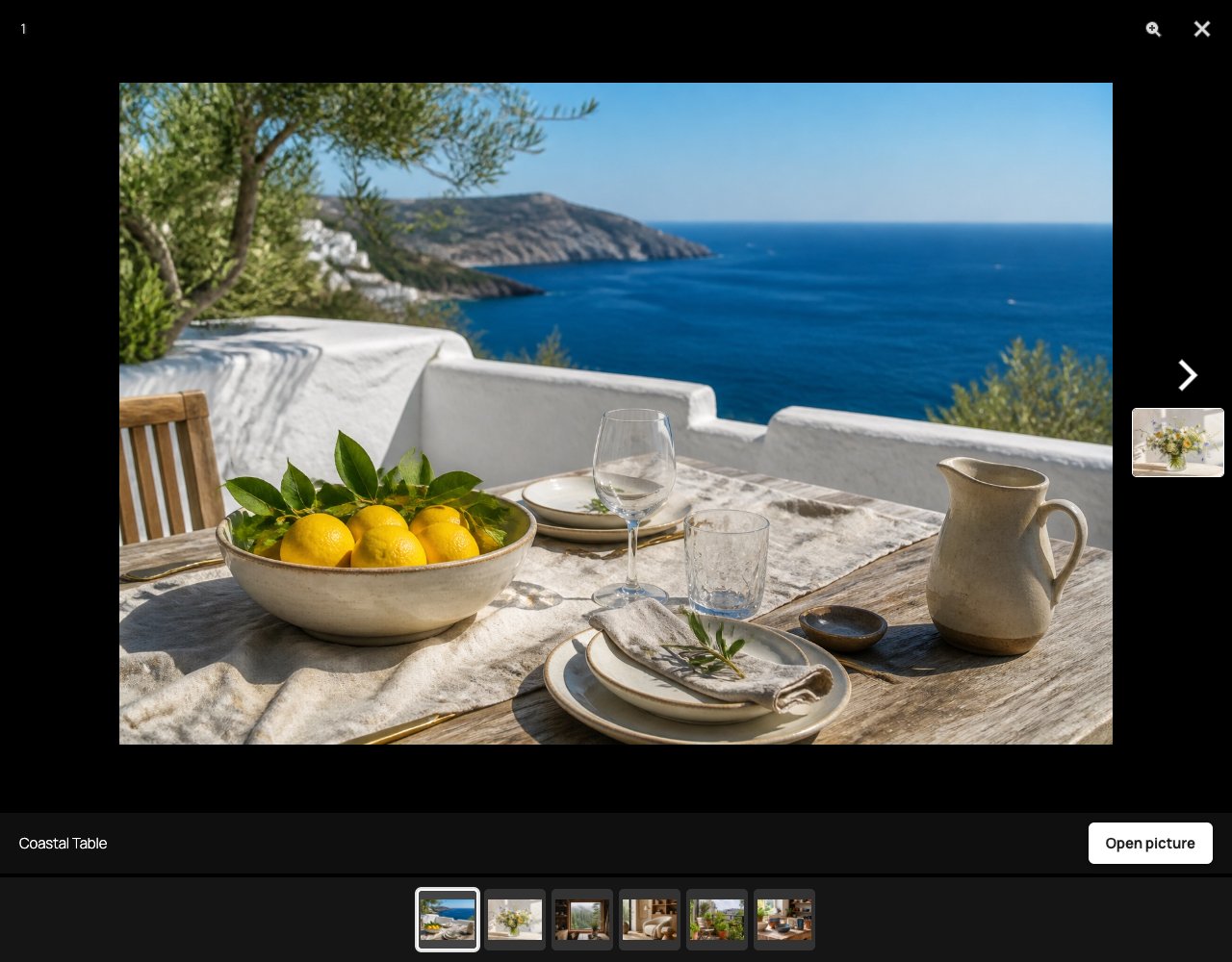
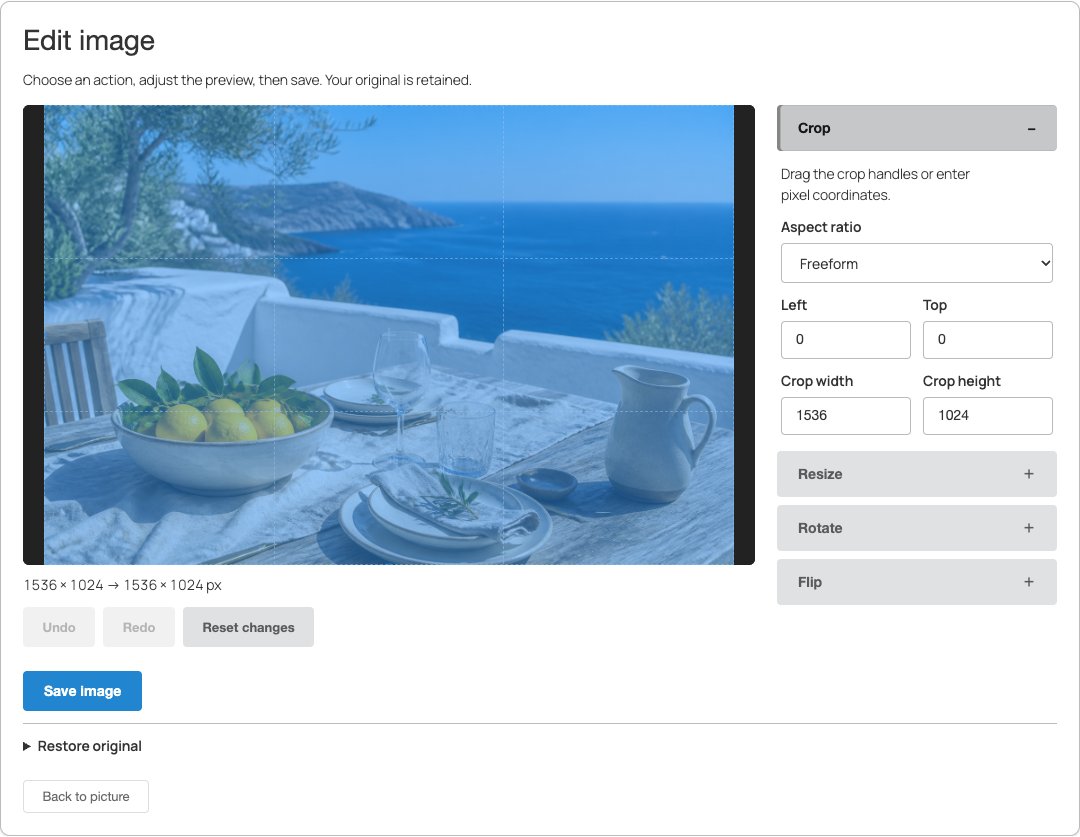
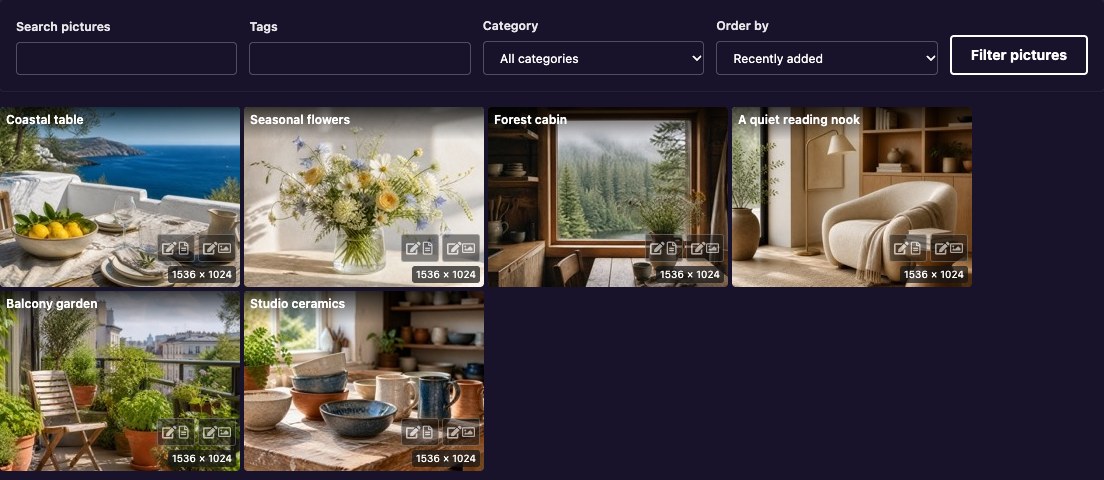
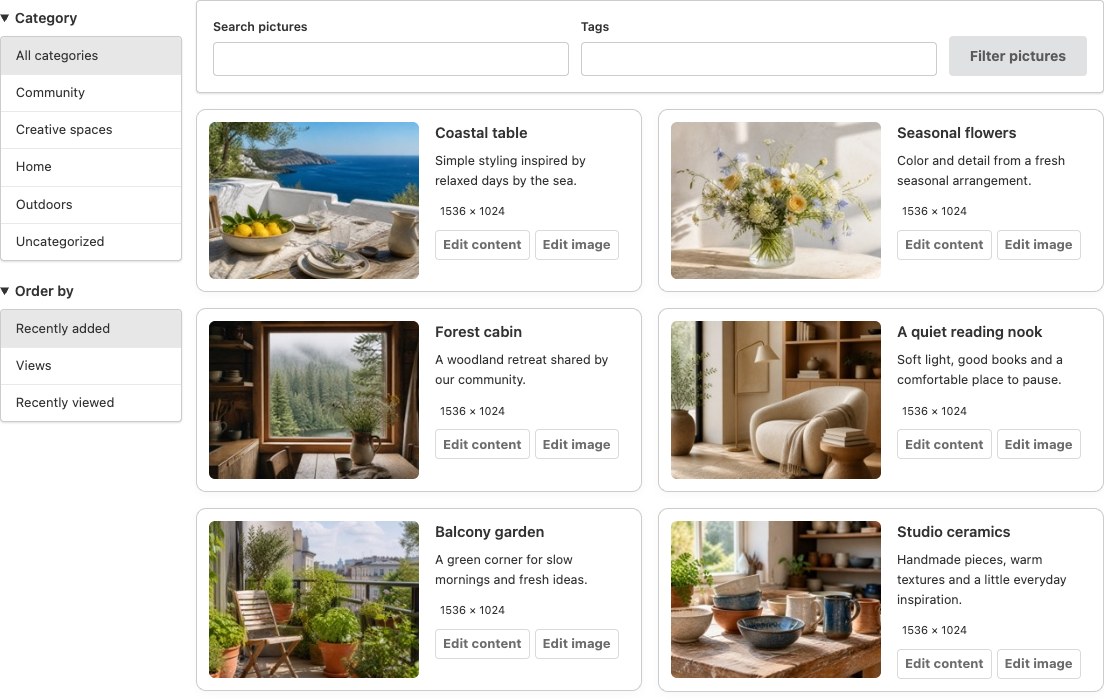
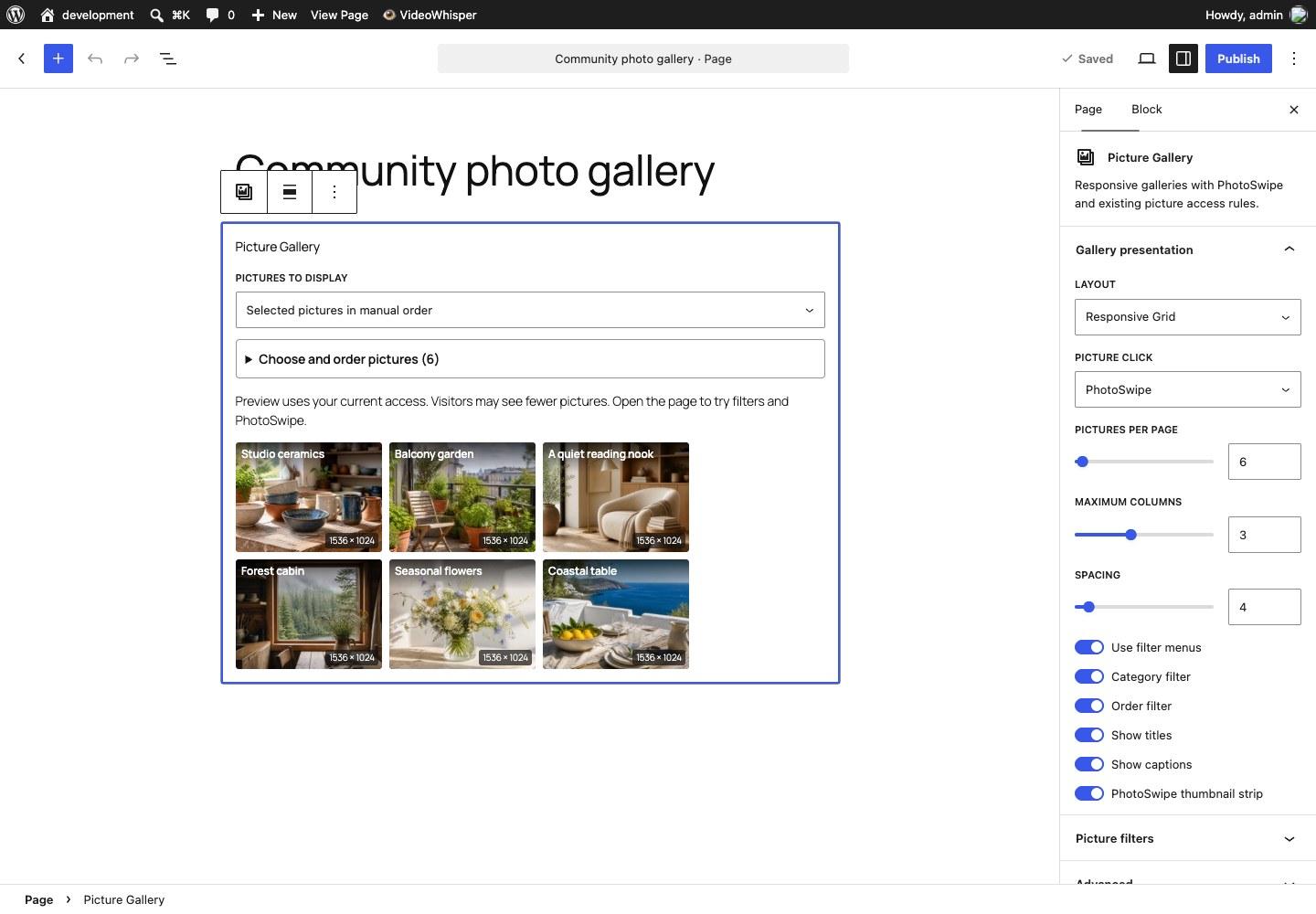
Blocks
This plugin provides 1 block.
- Picture Gallery Responsive galleries with PhotoSwipe and existing picture access rules.
Installation
- Install and activate Picture Gallery from WordPress Plugins.
- Open Picture Gallery settings and follow the setup guide for community uploads or a Media Library portfolio. With automatic page setup enabled, save settings to create Pictures, My Pictures, Upload Pictures and Guest Picture pages.
- Choose a layout and menu/dropdown filters under Display. New installations use Responsive grid with PhotoSwipe and thumbnail navigation enabled. Saved preferences on existing sites are preserved.
- Review upload and publishing permissions before inviting contributors. Configure guest uploads and optional CAPTCHA if required.
In the WordPress block editor, add Picture Gallery. Show the latest pictures matching filters, or choose Selected pictures in manual order. Search existing Pictures, or choose Media Library images and click Import selected images. The confirmation explains the target media-library gallery and review policy. Imports create separate Picture posts, retain native originals, and can be retried safely after a failed response. You can copy the native title, caption and alternative text at first import; retries preserve later Picture edits and never change shared attachment text. JPEG, PNG and GIF are supported; offloaded images need a readable local file. Removing a selection or block does not delete pictures. Imported pictures awaiting approval are visible to their owner and authorized editors, then appear to visitors after publication.
Automatic page setup can be disabled. Add these shortcodes to your own pages instead:
[videowhisper_pictures]— browse authorized pictures.[videowhisper_pictures author_id="current"]— the current user’s pictures; requires login.[videowhisper_picture_upload]— member uploader.[videowhisper_picture_upload_guest]— guest uploader, declared in normal stored page/post content.[videowhisper_pictures layout="legacy" menu="1" viewer="photoswipe"]— Styled Tiles with a filter menu.[videowhisper_pictures layout="grid" menu="0" viewer="photoswipe"]— compact grid with dropdowns.[videowhisper_pictures layout="cards" menu="1"]— picture cards with a filter menu.[videowhisper_pictures source=”selected” picture_ids=”123,456″ layout=”grid”] uses the same ordered selection as the block. An empty selected list displays no pictures. Both forms enforce the same fresh image authorization; filters can further narrow the selection.
The stored shortcode value legacy means Styled Tiles and remains compatible with existing pages. Additional presentation overrides include columns, gap, show_title, show_caption and viewer_thumbs.
FAQ
-
Which languages are included?
-
The plugin includes these translations: Spanish (es_ES), Brazilian Portuguese (pt_BR), French (fr_FR), Dutch (nl_NL), German (de_DE), Arabic (ar), Italian (it_IT) and Romanian (ro_RO). WordPress selects the site language for visitors and each user’s chosen language for the dashboard and block editor. Arabic follows WordPress’s right-to-left direction. Translations cover plugin controls and messages, not visitor-submitted picture titles or descriptions. WordPress.org language packs take precedence when installed.
Translation disclaimer: translations are provided as is. They were created with machine assistance and may contain inaccuracies, so please review them for accuracy before relying on them for your audience. Corrections and new languages are welcome through the support forum.
-
Can AI agents inspect my galleries?
-
On WordPress 6.9+, enable Read-only AI-agent integration in Picture Gallery > Options > Server. It is disabled by default, including on upgrades. The rest of the plugin still supports WordPress 6.5+.
The registered abilities are
picture-gallery/search-picturesandpicture-gallery/get-picture. They require an authenticated WordPress user with read permission and apply the same picture visibility, ownership, gallery, membership and extension veto rules as image browsing. Search published pictures or your own pictures (including your own unpublished items), filter by title/text search and gallery slug, or find missing picture-local alternative text/captions. Inspection returns current title, caption, description, picture-local alt text, publication status and processing state. Missing alt is not replaced with a guessed description. Responses contain no image-file URL fields, physical paths, arbitrary post metadata, journal secrets or pending replacement text from review journals.Search accepts
scope(publishedormine),search,gallery,needs_text(any,alt,caption),per_page(1–25, default 10) andpage(0–20, default 0). Results are ordered by descending ID and filtered for access before pagination. At most 1,000 candidates are examined per call;scan_limitedmeans narrow the search rather than assuming the results are exhaustive. No hidden-picture IDs or total counts are returned.get-picturerequirespicture_id.For MCP access, separately install the WordPress MCP Adapter and configure an authenticated compatible client using its documentation. The adapter’s default server exposes these abilities through its discovery and execution tools. A Site Manager OAuth connection does not automatically authenticate this separate endpoint. Picture Gallery adds no AI provider, account registration or outbound AI requests; your chosen client controls any further processing of the text it receives.
These abilities cannot edit, publish, upload, purchase content, delete files or start thumbnail repair/import. Turning the setting off removes registration on subsequent requests and denies execution through an already resolved ability. WordPress Abilities API REST access uses authenticated GET requests; client connection and credential requirements are managed by WordPress/the adapter. Abilities and MCP compatibility do not require an MCP server for normal gallery use.
-
Is the gallery and image editor free?
-
Yes. The included gallery layouts, local PhotoSwipe viewer, frontend uploader and image tools work without a paid account. Optional companion plugins and VideoWhisper services have their own terms.
-
What does my hosting need?
-
WordPress 6.5 or newer and PHP 8.2 or newer. Image tools use WordPress’s available GD or Imagick backend. Available memory, supported formats and image dimensions determine which files can be processed. Processing limits reject oversized work rather than promising unlimited editing. No FFmpeg or streaming server is needed for picture editing.
-
What can users edit?
-
Authorized owners can crop, resize without enlarging, rotate in quarter turns and flip horizontally or vertically. Crop coordinates follow the rotation and flips. Every save starts from the normalized master, avoiding repeated edits to a compressed preview. JPEG and PNG are editable; animated GIF editing is unavailable. Edit content opens the included picture details editor: title, caption, description, alternative text, and selection of existing categories and tags. Text changes use plain text; unchanged existing formatting is retained. The optional MicroPayments content-management link remains available separately for membership and monetization.
-
Will edits change a public picture before approval?
-
Users without the required publish permission send edits for review. Existing public media stays unchanged. An authorized moderator opens the picture’s editor to approve its pending generation. Restore original composition follows the same review rules. Picture details have a separate review submission: published details stay visible by default until approval. Under Display, administrators can choose to move published pictures to draft when users without publishing permission edit their details. The frontend warns before saving; approval restores the previous publication state. Moderators use Edit content to review and approve the submitted values. Changes made independently through the WordPress editor invalidate stale approval.
-
Can I preview the layouts before choosing site settings?
-
Yes. Enable Administrator frontend demo switcher under Display. Administrators get a closable Gallery preview box on listing pages. Choose Styled Tiles, Responsive grid or Picture cards and menu or dropdown filters, then Apply. Only that administrator’s current view changes; global settings are not saved and ordinary visitors cannot use the preview controls. Blueprint demos enable it automatically.
-
How do I recover an interrupted image edit?
-
First use the editor’s save-status check before trying another save. Administrators can inspect Picture Gallery > Image Edit Journals. Recovery acknowledges an already committed generation or places a complete candidate into pending review only if its base media and owner are unchanged. It never repeats a partly processed recipe. Active/orphaned media locks, changed sources, incomplete candidates and ambiguous older records require manual review; no forced takeover is offered.
-
Can I clean up old edit files?
-
Files are retained indefinitely by default. In Image Edit Journals, explicitly abandon unfinished work where appropriate, then allow cleanup for a terminal edit. This starts a fresh seven-day hold. Preview the edit again after the deadline before applying cleanup. Only proven, unchanged, disconnected edit files and their own header-only attachments are eligible. Originals, masters, previews, active/pending/previous generations and shared or ambiguous files stay protected. Older journals without creation evidence remain retained. No automatic deletion runs. Compact request receipts remain to prevent replay; edit-history and owned-file limits still apply to retained work.
-
Will my existing pictures still work after updating?
-
Yes: existing posts, URLs, authors, galleries and media are preserved. Encountered pictures are inventoried on demand, with a small queued batch for listings/views and immediate inventory on authorized editing. Missing or ambiguous files require administrator repair instead of a destructive guess. Existing explicit layout/click choices remain; select PhotoSwipe under Display to enable it for those listings.
-
Why are thumbnails not all the same size?
-
Previews are never stretched beyond their available pixels. When thumbnail settings change, encountered outdated thumbnails queue a bounded refresh; the administrator thumbnail tool can advance the rest. Small originals remain small. Cards reserve room for text; Responsive grid keeps a tighter image-focused presentation.
-
Can listings show ratings and likes?
-
Yes, with the optional Rate Star Review plugin and its Picture Gallery integration enabled. Available star ratings appear in listings. Voting also requires the picture post type and the picture’s category to be enabled in Rate Star Review. Its login, retract-vote and optional payment rules still apply. Compact layouts show votes above stars at the lower left; cards place them beside the image.
-
Can I restrict access or sell pictures?
-
Gallery rules and supported membership integrations control listing/viewer authorization. They do not protect direct public upload URLs. Use an appropriate protected-file delivery solution if preventing direct downloads is required.
-
What happens when a picture is deleted?
-
Media is retained by default, including after permanent picture deletion, plugin deactivation or uninstall. Media Maintenance provides inventory/backfill previews and an opt-in policy for future deletions. Purge waits at least 24 hours and requires a separate cleanup batch. Shared, changed, ambiguous and legacy files without creation provenance are preserved. On multisite, physical media cleanup remains disabled because site-local scans cannot establish cross-site ownership.
-
What happens after an interrupted upload?
-
Use Check / resume upload or Retry same file with its original fields instead of starting another copy. A request identity prevents duplicate imports; changed bytes/fields conflict. Member self-service requires the original login session. Upload Journals lets administrators inspect and recover eligible unfinished work to pending review, or explicitly abandon unchanged unpublished drafts. Media retention defaults to indefinite; opt-in abandoned-upload cleanup has a fresh seven-day hold and separate preview/apply steps. Recovery requires the original single processing host, working local locks and unchanged storage; changed hosts or ambiguous state require review.
-
Does the plugin send images to an external service?
-
Gallery browsing and image editing run locally. The optional reCAPTCHA service is described below. Images are not sent to an external image editor. Companion plugins and theme services have their own disclosures.
-
Guest form validation and privacy
-
Each guest form has its own controls and nonce. Shortcode owner, gallery, category, tag, description and email settings are authoritative; submitted hidden fields cannot override them. Errors preserve valid text fields and ask the visitor to select the picture again. The ordinary HTML form works without JavaScript when reCAPTCHA is disabled. All guest submissions remain pending, including submissions from a logged-in administrator.
The default attempt limit is 20 per connection per hour, including failed form and verification attempts. It uses the web server connection address, ignores forwarded browser headers, and stores only a keyed address hash, count and expiry in a non-autoloaded counter. Counters expire after one hour; subsequent guest attempts with the attempt limit enabled remove up to twenty expired counters. Expired records can remain stored until that later cleanup. Set Guest Upload Attempts per Hour to 0 to disable this tracking. The separate Limit Uploads per IP setting counts existing guest pictures, including pending, draft and trashed items; uploader email and IP metadata remain with those pictures. Shared connections share limits. Configure trusted client addresses at the web server when using a reverse proxy.
Google reCAPTCHA v3 is optional and loads only on guest form pages after an administrator configures a site key. Google’s browser script receives visitor/browser information and issues a token for action vwpg_guest_upload; submitting the form sends that token and the configured secret from the server to Google’s verification endpoint with an eight-second timeout. Missing, failed, low-score, wrong-action, wrong-host or malformed verification responses block intake. See reCAPTCHA, Google Privacy Policy and Google Terms. Disable the site key to remove this integration. No uploader email, description or image bytes are sent by the plugin’s verification request.
-
Durable guest uploads and browser receipts
-
Guest uploads use a signed browser-bound form and WordPress admin-post transport. The server reloads the matching shortcode from its stored page/post content before accepting a new request and before promoting processed media. Browser-submitted owner, gallery or hidden defaults never grant authority. Changed/removed forms, unreadable/password-protected content, stale grants and a different browser/login context stop processing. Guest forms must be declared in normal readable post/page content; dynamically injected widget/template/builder forms without a matching stored declaration fail safely and need a supported integration.
A successful or authorized failed POST redirects with HTTP 303 to a GET receipt. Reloading a receipt performs no image processing or publication. Each browser/form retains the same request identity across reloads and lost POST responses; an exact retry acknowledges its existing picture and changed bytes/metadata conflict. Check upload reads its state; Resume stored upload is a separate nonce-protected POST, always pending for unfinished guest work. Do not start another copy after uncertainty. If the original intake is missing, select the same picture and original field values; otherwise contact the administrator with the upload reference. Active workers, replaced temporary locks, changed files/roots and human-edited drafts require review. Recovery uses the same single-host safeguards as member journals.
Submit another picture is an explicit POST after completion or abandonment. An atomic private current-request pointer prevents an old tab from silently replacing a newer request. Guest upload cookies are site-specific, HttpOnly, SameSite=Lax and Secure on HTTPS, expire after seven days, and contain only a random browser secret. Logged-in receipts additionally depend on that WordPress login session. Clearing cookies, switching browsers/logins or expiring the browser cookie loses self-service access; administrator journal inspection remains available. Exclude guest-form pages from full-page caches: the plugin sends private/no-store headers, and a cached grant from another browser is rejected.
Guest receipts reveal no picture/file URL, private picture ID, email, description or raw browser secret. Authorized validation failures preserve bounded text in one ten-minute feedback transient per browser/form, without file bytes, CAPTCHA tokens or nonces; expired stored transients may await WordPress cleanup. Successful feedback clears those text fields. The shared private upload journal retains source relationships, request fingerprints and submitted guest title/email/IP/metadata under the existing retention policy. Minimal current-request pointers, completion receipts and cleanup tombstones are retained to prevent duplicate replay; do not delete these records independently. Administrator recovery/abandonment/retention also supports owner ID 0 guest drafts. Deactivation/uninstall preserve this history and media.
Moderator notification is attempted at most once after the guest picture commits. An interrupted claimed delivery is not sent again automatically, so mail can be missed; Upload Journals shows its notification state for administrator review. No automatic retry sends duplicate mail. Older authenticated integrations retain their existing responses; durable recovery requires a stable request identity.
-
Where can I report an issue, request a feature or discuss custom development?
-
Contact VideoWhisper through support and consultation to report problems, suggest features or discuss custom development for your website. Include your WordPress/PHP versions and steps to reproduce a problem. Do not include passwords or private media in public reports.
-
Where do I report security bugs found in this plugin?
-
Please report security bugs found in the source code of the Picture Gallery plugin through the Patchstack Vulnerability Disclosure Program. The Patchstack team will assist you with verification, CVE assignment, and notify the developers of this plugin.
Reviews


Contributors & Developers
“Picture Gallery – Frontend Uploads & Image Editor” is open source software. The following people have contributed to this plugin.
Contributors
“Picture Gallery – Frontend Uploads & Image Editor” has been translated into 1 locale. Thank you to the translators for their contributions.
Translate “Picture Gallery – Frontend Uploads & Image Editor” into your language.
Interested in development?
Browse the code, check out the SVN repository, or subscribe to the development log by RSS.
Changelog
1.7.28
- Add Italian and Romanian translations and refresh the Spanish, Brazilian Portuguese, French, Dutch, German and Arabic catalogs.
- Make remaining upload, import, legacy gallery and block editor messages translatable, and clarify wording across upload, import and gallery filter labels.
- Add accessible labels to icon-only Search and Reload buttons.
1.7.27
- Complete Spanish interface coverage and add Brazilian Portuguese, French, Dutch, German and Arabic catalogs for PHP, the block editor and frontend tools.
- Refresh setup, gallery, image-editing and optional read-only AI-agent benefits in the plugin description.
1.7.26
- Optional read-only WordPress Abilities API integration on WP 6.9+, with WP 6.5 compatibility retained.
- Authenticated agents can search authorized picture metadata and inspect text/processing status using existing image visibility and membership rules.
1.7.25
- Clearer setup guidance and visual layout choices, with existing settings preserved.
- Media Library imports can copy initial titles, captions and alternative text without overwriting later Picture edits.
- Repaired Spanish translation loading and refreshed setup, editor and frontend catalogs.
1.7.24
- Added a native Picture Gallery block, authorized Picture search and Media Library picker with explicit, recoverable imports that retain original attachments.
- Shared selectable layouts, filters, manual picture order, pagination and PhotoSwipe with shortcodes. Image visibility and membership rules apply on every request.
1.7.23
- Restore listing star ratings and provider-controlled voting, including after filtering.
- Keep compact tile/grid controls over the image and card metadata beside the thumbnail.
- Add an administrator-only layout/filter preview switcher, enabled in blueprint demos.
- Edit picture titles, captions, descriptions, alternative text and existing categories/tags in My Pictures. Lesser-role edits await approval; optionally move published pictures to draft.
1.7.22
- Clarify layout names, share menu filters across layouts and enable PhotoSwipe for Styled Tiles when selected.
- Suppress repeated My Pictures links in frontend menus without deleting saved menu items.
- Refine thumbnail tiles, resolution labels, hover effects and matching owner editing controls.
- Add administrator image-edit inspection, pending-only recovery and explicit retained-file cleanup safeguards.
- Refresh setup guidance, feature benefits, FAQs and layout screenshots.
1.7.21
- Fix block-theme navigation and comments assets loading before the document head.
- Keep compact grid image links clickable beneath title overlays.
- Include security hardening for custom CSS, picture metadata, import cleanup and administrator requests.
- Verify supported WordPress/PHP, upload recovery, media retention and release packages.
1.7.20
- Security: contain legacy custom CSS within its style element and validate/escape stored picture dimensions.
- Security: require a verified administrator import request before expired-file cleanup; harden admin callbacks, form nonces and legacy retention decoding.
1.7.19
- Keep PhotoSwipe navigation disabled until adjacent slides are ready, avoiding early-click blank viewers.
- Give the finalized complete, clickable arrow previews a fresh asset version.
1.7.18
- Show larger, complete previous/next previews below PhotoSwipe arrows, with a shared clickable and keyboard-accessible button.
- Keep navigation controls usable on touch and smaller screens without covering the caption.
1.7.17
- Remove custom green control colors and use neutral Fomantic buttons, palette-aware filters, and theme accents.
1.7.16
- Expand only the selected Crop, Resize, Rotate or Flip controls, with clear save and restore actions.
- Reuse FansPaysite Fomantic components and follow live theme changes across galleries and the image editor.
1.7.15
- Automatically prepare intact legacy pictures on demand from galleries, picture views and previews, and dashboard lists/editors.
- Share one idempotent importer with the frontend editor; background inventory stays bounded and preserves existing files.
- Back off failed imports and retry changed legacy media without a site-wide upgrade scan.
1.7.14
- Open image tools directly when entering Edit image, with retry and specific loading, format and repair messages.
- Safely inventory intact legacy JPEG/PNG media on an authorized editor-opening request; ambiguous media remains preserved for review.
- Give Edit content and Edit image clear buttons in a separate row so status badges cannot cover them.
1.7.13
- Distinct compact grid and metadata cards; thumbnails never stretch beyond configured or intrinsic dimensions. Long legacy titles wrap within their tiles.
- Queue outdated thumbnails on listing reads; bounded background processing and Media Maintenance batches preserve active edited compositions and originals.
- PhotoSwipe includes an Open picture button, image-to-post click, previous/next thumbnail previews and an optional default-on moving thumbnail strip. Authorized neighbors load across listing pages in bounded windows.
- Frontend owner crop, aspect-preserving resize, quarter-turn rotation and both flips with numeric/drag selection, preview, undo/redo, immutable generations, review/approval, restore and save-status recovery. JPEG/PNG editing uses local WordPress image tools.
- Strict object permissions, nonce/POST/schema validation, revision conflicts, immutable source checks and local licensed Cropper.js assets.
1.7.12
- Updated plugin picture/gallery templates to use block-theme headers, footers and comments without deprecated classic fallbacks.
- Added selectable responsive grid/cards layouts with server-rendered images, scoped filters and real pagination links; existing sites retain Legacy by default.
- Added local, lazy PhotoSwipe viewing with current-page navigation, zoom, safe captions, details links and fresh server image authorization.
- Shared gallery and membership-aware image permission checks now protect modern/legacy lists and standalone picture output. Unknown paid entitlements fail closed.
- Added allowlisted presentation settings and regression coverage for authorization, stale requests, no-JavaScript browsing and independent galleries.
1.7.11
- Enforced site/network image MIME restrictions and exhausted upload allowances across shared validation and bounded raw intake.
- Added optional administrator-built, site-local reference hints with bounded build/prune batches. Every hit is rechecked against current data; misses retain conservative reference scans.
- Preserved configured Picture Gallery upload roles while enforcing native creation/publication capabilities for other configured post types.
- Protected unpublished, password-protected and non-public picture output in listing and standalone shortcodes; previews no longer repair images while browsing.
- Added safe defaults on new multisite sites. Physical gallery purge and abandoned-file cleanup remain disabled on multisite because site-local scans cannot establish cross-site ownership.
1.7.10
- Add administrator-only media diagnostics with backend-advertised format support, shared effective image/upload limits and read-only cursor batches.
- Summarize legacy/repair/pending/failed picture states and upload journal phases without exposing submitted metadata, paths or worker credentials.
- Bound diagnostic rows and payloads; distinguish sampled counts and reported backend support from site totals and verified editing capability.
1.7.9
- Add My Pictures beside Browse Pictures, using the shared listing shortcode with a current-user author filter and publication status labels.
- Bound listing sizes and allowlist sort keys; keep picture browsing read-only and personalized responses private.
- Route legacy raw, multipart and multi-file forms through shared durable upload journals; accept optional stable request IDs while preserving HTML responses.
- Scan media references in bounded primary-key batches and bound directory enumeration; retain files whenever safety limits are reached.
1.7.8
- Add browser-bound durable guest request identities, shared upload journals and safe pending-only recovery.
- Use POST/303/GET receipts; reloads and lost responses rediscover the original request, and new pictures require an explicit action.
- Resolve upload settings from stored shortcode declarations and recheck changed targets before promotion.
- Extend administrator recovery/retention to owner-zero guest drafts; keep terminal replay blocks and attempt moderator mail at most once.
1.7.7
- Scope guest forms, labels, nonces and reCAPTCHA controls to each instance; support ordinary HTML submission without JavaScript when verification is disabled.
- Enforce trusted shortcode destinations and validate bounded scalar fields before intake; keep all guest submissions pending.
- Fail safely on reCAPTCHA outages and invalid replies; preserve form fields and remove token/debug output.
- Add atomic hourly guest attempt limits and bounded expired-counter cleanup; include pending/draft/trash pictures in the existing upload limit.
1.7.6
- Administrator upload journal inspection, pending-only recovery and explicit abandonment.
- Bounded cleanup with retention holds, source provenance and permanent replay-blocking receipts.
1.7.5
- Requires WordPress 6.5 and PHP 8.2 or newer.
- Member uploads use persistent request identities, safe status lookup and draft recovery.
- Legacy raw uploads stream through a bounded size-checked reader.
1.7.4
- Add versioned media manifests and explicit administrator-only legacy inventory/backfill with preview and cursor support.
- Preserve originals and shared attachments; retain media by default after permanent picture deletion.
- Add guarded, opt-in retained-media cleanup after a 24-hour grace period, with ownership and reference checks.
- Keep older working renditions intact during refresh and prefer manifest relationships when rendering.
1.7.3
- Fix theme JavaScript appearing as text below AJAX picture lists; scope theme changes to the gallery.
- Normalize JPEG EXIF orientation (including mirrored images) into a separate display copy, preserving original bytes.
- Generate thumbnails with the available WordPress image editor and preserve PNG transparency.
- Reject oversized image dimensions and insufficient processing memory before decoding; report processing failures accurately.
1.7.2
- Added structured upload results with accurate frontend processing, published, pending-review and failure states.
- Isolated multiple upload forms, limited concurrent transfers, and refreshed matching galleries only after confirmed publication.
- Shared image validation between uploads and imports; preserved source attachments during metadata refresh.
- Kept imported pictures unpublished until processing completes, with guest submissions pending from creation.
1.6.6
- Hardened server-side picture import and delete handling with nonce, capability, path containment, and file type checks.
1.6.5
- Moved screenshots to SVN assets and updated WordPress.org support metadata.
1.5
- Guest Picture Upload:
- Google reCAPTCHA v3 integration
- Limit uploads per IP
- Moderator notification by email (custom)
- Custom message for upload success
- Persistent form fields in case of error
1.4
- Media Library integration
- Menu in listings with categories, order
- PHP 8 support
1.3
- Integrates Rate Star Review plugin for star reviews
- Review form and list on picture page
- Rating stars in listings
- Integrate Semantic UI interface
- Filter by picture tag, name
- Sort by rating, number of ratings, points
1.2
- Integrates Paid Membership and Content plugin to allow selling items
1.1
- First public release.