WordPress.org

Plugin Directory

Pixel Manager for WooCommerce – Conversion Tracking, Google Ads, GA4, TikTok, Dynamic Remarketing

Pixel Manager for WooCommerce – Conversion Tracking, Google Ads, GA4, TikTok, Dynamic Remarketing

Description

The Pixel Manager is the most complete conversion tracking plugin for WooCommerce. Set up Google Ads conversion tracking, Google Analytics GA4 e-commerce tracking, Meta/Facebook Pixel, TikTok Pixel, and more – in minutes, not hours. No coding required.

Unlike Google Tag Manager (GTM), which requires significant technical expertise to configure WooCommerce e-commerce tracking correctly, the Pixel Manager provides a turnkey solution with over 12 years of development. It automatically handles edge cases like payment gateway redirects, order duplication prevention, and consent mode – all the things that take hours to get right with manual tag management.

🆕 New: Conversion tracking for OpenAI ads on ChatGPT

OpenAI is rolling out advertising on ChatGPT, and the Pixel Manager is one of the first WooCommerce plugins to support it. The Pro version tracks your OpenAI ads with the browser pixel, a server-side Conversions API connection, and Advanced Matching – so you can measure exactly which purchases your ChatGPT ads drive, from day one. Also new: Microsoft Clarity heatmaps and session recordings (Pro, beta), and the rebuilt, faster Nova admin interface (free).

🚀 Endorsed by Google’s Tag Team

This plugin was recommended to us by Google’s Tag Implementation Team. That should say enough.

says @dpackert24

This plugin was demonstrated to me by a Google Tagging Support person. ‘nough said 🙂

says @galbaras

We’re using this for our biggest clients and it’s working great!

says @wodobo

Pixel Manager for WooCommerce is the go-to plugin for both tech wizards and casual users.

says @chxz

What makes the Pixel Manager different?

Most WooCommerce tracking plugins only handle the basics: firing a conversion pixel on the thank you page. The Pixel Manager goes much further. It tracks the entire e-commerce customer journey – from product impressions and add-to-cart events through checkout and purchase – across all major advertising and analytics platforms simultaneously. This gives you complete data for conversion optimization, dynamic remarketing audience building, and accurate ROAS reporting.

The Pro version adds server-side tracking (Conversion API / CAPI) that sends conversion data directly from your server to advertising platforms. This bypasses browser limitations like ad blockers, Safari ITP cookie restrictions, and network issues – typically recovering up to 30% more conversions that browser-only tracking misses. Our unique Automatic Conversion Recovery (ACR) feature goes even further by automatically identifying and recovering missed conversions nightly.

Key Benefits

✅ Easy setup – just enter your tracking IDs and you’re done.
✅ Accurate e-commerce event tracking across all platforms.
✅ GDPR and CCPA compliant with Google Consent Mode v2.
✅ Works with 15+ consent management platforms out of the box.
✅ Lightweight – won’t slow down your WooCommerce store.
✅ Payment Gateway Accuracy Report – diagnose conversion tracking drops.
✅ Automatic Conversion Recovery (ACR) – recover lost conversions (Pro).
✅ OpenAI ads (ChatGPT) conversion tracking, browser and server-side (Pro).
✅ AI-ready – AI agents can safely configure the plugin through the WordPress Abilities API.

Free Tracking Pixels

  • Google Ads Pixel – conversion value tracking, dynamic remarketing, cart item data
  • Google Analytics Pixel (GA4) – full Enhanced E-Commerce tracking
  • Meta Ads Pixel (Facebook Pixel) – remarketing events and custom audiences
  • Hotjar Pixel – heatmaps and session recordings

Free Features

  • Google Tag Gateway for Advertisers – first-party tracking through Google’s servers
  • Google Consent Mode v2 – full compliance with EU, UK, and US privacy regulations
  • Google Ads Dynamic Remarketing – build audiences based on product interactions
  • Google Ads Cart Item Tracking – feed cart data to Smart Shopping and Performance Max campaigns
  • Google Shopping New Customer Parameter – optimize for new customer acquisition
  • GA4 Enhanced E-Commerce – track product impressions, add to cart, checkout steps, and purchases
  • Meta Remarketing Events – ViewContent, AddToCart, InitiateCheckout, Purchase
  • Basic Order Duplication Prevention – avoid counting the same conversion twice
  • Customizable filters – fine-tune tracking output for your specific setup
  • Lazy-loaded product list support – works with infinite scroll and AJAX product loading
  • Payment Gateway Accuracy Report – identify which payment gateways cause conversion tracking drops
  • Nova admin interface – rebuilt from the ground up, faster and cleaner, with a getting-started checklist for new installs
  • Abilities API integration – AI agents (Claude, ChatGPT, and others) can discover, read, and safely update your tracking settings
  • Opportunities – prioritized, actionable suggestions to improve your tracking and campaign performance

Have a look at the full feature list over here.

Premium Tracking Pixels

  • Adroll Ads
  • Contentsquare Statistics
  • CrazyEgg Analytics
  • Criteo Ads – retargeting and audience events through the Criteo OneTag (beta)
  • GroundTruth Ads – omnichannel engagement and conversion tracking (beta)
  • Hyros – ad attribution through the Hyros Universal Script with funnel milestone tags (beta)
  • LinkedIn Ads
  • Microsoft Ads (Bing Ads)
  • Microsoft Clarity – heatmaps and session recordings with e-commerce events (beta)
  • Mixpanel – product analytics with the full shopping funnel, server-side purchases through the Ingestion API, session replay and user identification (beta)
  • Nextdoor Ads – conversion tracking through the Nextdoor Universal Pixel (beta)
  • OpenAI Ads – conversion tracking for ads on ChatGPT
  • Outbrain Ads
  • Pinterest Ads
  • Reddit Ads
  • Snapchat Ads
  • Taboola Ads
  • TikTok Ads
  • Triple Whale – visitor journey tracking and marketing attribution (beta)
  • X (Twitter) Ads
  • VWO (Visual Website Optimizer) – A/B testing

Premium Features

  • Automatic Conversion Recovery (ACR) – automatically recover missed conversions nightly
  • Server-side tracking (CAPI) – Meta, TikTok, Pinterest, Snapchat, Reddit, OpenAI, GA4 Measurement Protocol
  • Advanced Order Duplication Prevention
  • Google Ads Enhanced Conversions – first-party data for improved attribution
  • Google Ads Conversion Adjustments – send refund data back to Google Ads
  • Scroll Tracking – measure how far visitors scroll on your pages
  • Automatic Phone and Link Click Tracking

Have a look at the full feature list over here.

Ready to recover lost conversions and get accurate tracking data? Visit sweetcode.com to learn more about the Pro version.

Documentation

Comprehensive setup guides, troubleshooting, and API references: Open the documentation

News

Consent Management

The Pixel Manager integrates with all major Consent Management Platforms (CMPs) to ensure your tracking pixels respect visitor consent choices. It supports Google Consent Mode v2, including region-specific consent defaults for the EU, UK, and US states with privacy regulations.

Compatible consent management plugins:

Please read the following for additional setup information

Requirements

List of requirements

Security Review

Although we follow security best practices, we wanted to ensure that we didn’t miss anything. So, we had the plugin reviewed by Patchstack, a cybersecurity company specializing in WordPress security.

The summary of their report was: “We were unable to detect any vulnerabilities that would impact the security status of the plugin in a serious way.”

Managed Vulnerability Disclosure Program

We are committed to ensuring the security of our customers and their data. If you believe you have found a security vulnerability in the Pixel Manager for WooCommerce, we encourage you to report it through Patchstack our security partner. Patchstack runs a managed Vulnerability Disclosure Program (mVDP) that helps us receive, triage, and respond to reported vulnerabilities. Patchstack also provides a reward for the responsible disclosure of security vulnerabilities. Report a vulnerability

Screenshots
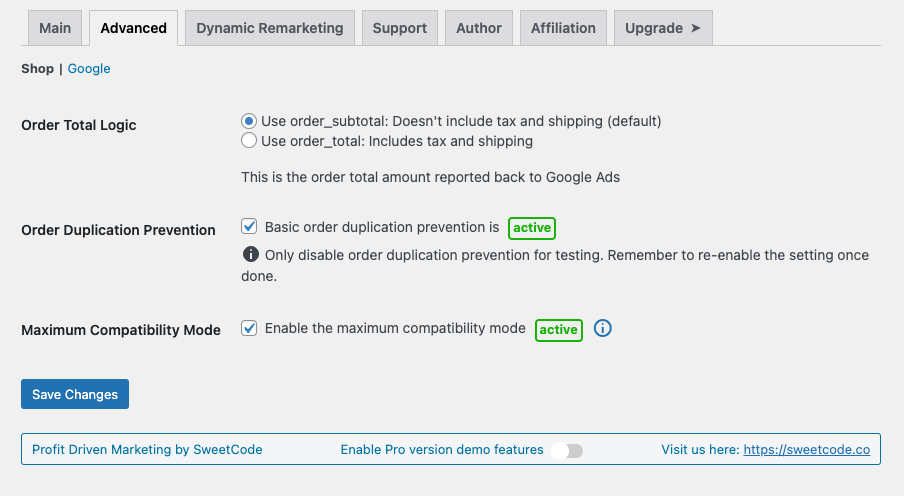
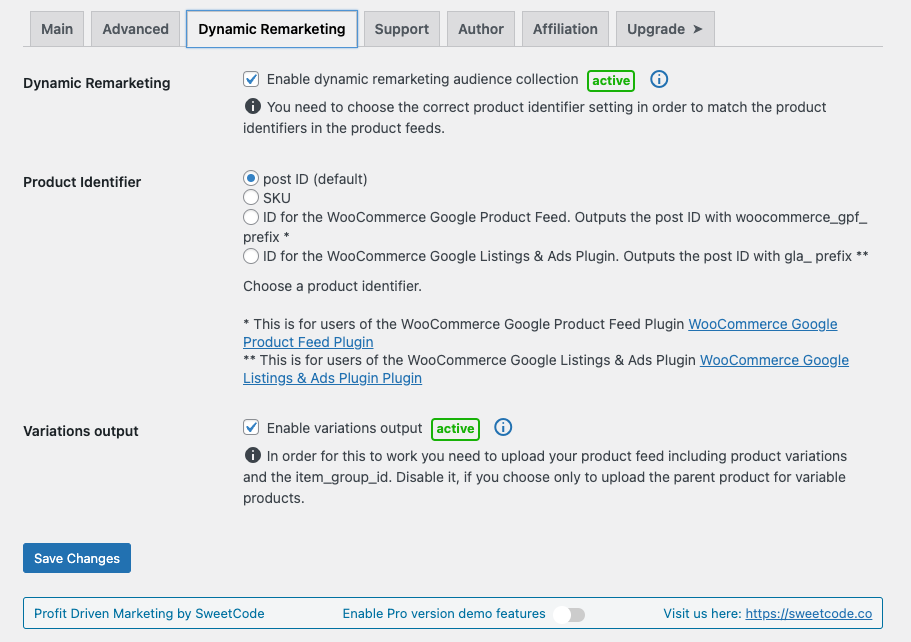
Installation

  1. Upload the plugin directory into your plugin’s directory /wp-content/plugins/

  2. Activate the plugin through the ‘Plugins’ menu in WordPress

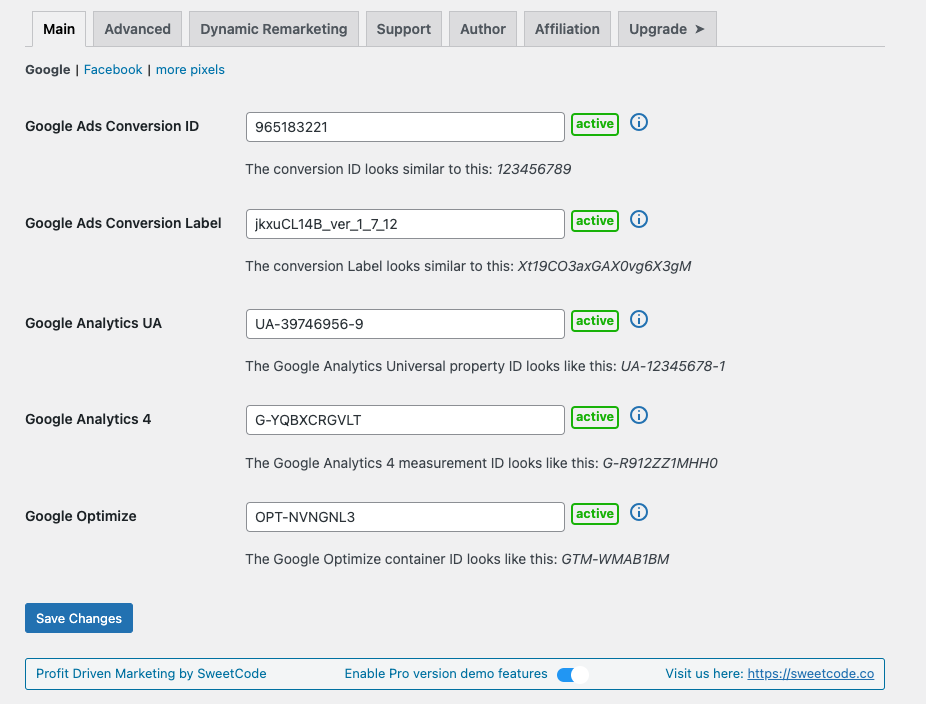
  3. Get the Google Ads conversion ID and the conversion label. You will find both values in the Google Ads conversion tracking code. Get the conversion ID and the conversion label

  4. In the WordPress admin panel go to WooCommerce Pixel Manager, open the ‘Tracking Pixels’ tab and expand the ‘Google (Ads & GA4)’ section. Please enter the conversion ID and the conversion label into their respective fields.

  5. Head over to our documentation and follow our installation guides. Here are some of our most popular guides:

  6. And read through our FAQ.

FAQ

How does Pixel Manager compare to Google Tag Manager (GTM)?

While Google Tag Manager is free, it requires significant technical expertise and many hours of configuration to set up proper WooCommerce e-commerce tracking. You need to create custom data layers, configure triggers and tags for each platform, handle consent mode integration manually, and test extensively to avoid tracking errors. The Pixel Manager provides a turnkey alternative that’s optimized specifically for WooCommerce with over 12 years of development. It automatically configures the correct e-commerce events, handles edge cases like payment gateway redirects and order deduplication, and includes unique features like Automatic Conversion Recovery (ACR) and the Payment Gateway Accuracy Report that GTM cannot replicate. Most users find Pixel Manager saves dozens of hours compared to manual GTM setup, while delivering more accurate conversion data.

What is server-side tracking (Conversion API / CAPI) and why does it matter?

Server-side tracking sends conversion data directly from your WooCommerce server to advertising platforms like Meta (Facebook), TikTok, Pinterest, Snapchat, Reddit, OpenAI, and Google Analytics 4 – rather than relying solely on browser-based pixels. This results in more reliable, accurate tracking because it works even when browser tracking is limited by ad blockers, Safari ITP cookie restrictions, browser privacy settings, VPNs, or network issues. Our Pro version typically recovers up to 30% more conversions compared to browser-only tracking, directly improving your campaign optimization and ROAS calculations.

Can I track conversions from OpenAI ads on ChatGPT?

Yes. The Pro version includes an OpenAI tracking pixel with browser-side conversion tracking, a server-side Conversions API connection, and Advanced Matching for improved event matching. You only need to enter your OpenAI pixel ID and, for server-side tracking, a Conversions API token. Purchase conversions are always sent server-side for maximum reliability, so you can accurately measure which sales your ads on ChatGPT generate.

How does Automatic Conversion Recovery (ACR) work?

ACR is our unique Pro feature that automatically recovers conversions missed due to tracking issues – whether from payment gateway redirects (like PayPal), browser limitations, ad blockers, or network problems. It runs nightly using the WordPress Action Scheduler, identifies WooCommerce orders that weren’t properly tracked by your advertising pixels, and sends the conversion data to your advertising platforms retroactively (within the allowed attribution windows). This can recover approximately 50% of otherwise lost conversions, directly improving your Google Ads, Meta, and TikTok campaign performance.

Does the Pixel Manager support Google Consent Mode v2?

Yes. The Pixel Manager fully supports Google Consent Mode v2, including the new ad_user_data and ad_personalization parameters required by Google since March 2024. It also supports region-specific consent defaults for the EU, UK, and 11+ US states with privacy regulations. The plugin integrates with 15+ consent management platforms (CMPs) out of the box, automatically adjusting tracking behavior based on visitor consent choices. This ensures your WooCommerce store is compliant with GDPR, CCPA, and other privacy regulations while still collecting the maximum amount of conversion data allowed.

What WooCommerce e-commerce events does the Pixel Manager track?

The Pixel Manager tracks the complete e-commerce customer journey: product list views (impressions), product detail views, add to cart, remove from cart, begin checkout, add payment info, and purchase events. These events are sent simultaneously to all configured tracking pixels (Google Ads, GA4, Meta, TikTok, etc.) with standardized product data including product ID, name, category, brand, price, and quantity. This comprehensive event tracking powers Google Analytics GA4 Enhanced E-Commerce reports, Google Ads Smart Shopping and Performance Max campaigns, Meta dynamic remarketing ads, and TikTok product catalog campaigns.

Can I use the Pixel Manager to track Google Ads conversions on WooCommerce?

Yes. The Pixel Manager makes Google Ads conversion tracking setup on WooCommerce straightforward. Simply enter your Google Ads Conversion ID and Conversion Label, and the plugin automatically tracks purchase conversions with accurate order values, fires dynamic remarketing events for audience building, sends cart item data to optimize Performance Max and Shopping campaigns, tracks the Google Shopping new customer parameter for new customer acquisition campaigns, and supports Enhanced Conversions (Pro) for improved attribution using first-party data.

Will the Pixel Manager slow down my WooCommerce store?

No. Performance is a core design priority. The back-end code is small and efficient with fast, cached database queries. Larger tasks like ACR processing run during off-peak hours using the WordPress Action Scheduler. The front-end JavaScript library is compiled, tree-shaken to only load code for active pixels, minified, and pre-compressed with gzip and brotli. The Pro version adds lazy loading of the tracking library to further reduce impact on page load time. Many users report the Pixel Manager is faster than alternative tracking plugins and significantly lighter than a comparable Google Tag Manager setup.

Is there detailed documentation for the plugin?

Yes. Head over to this link: Documentation

How do I check if the plugin is working properly?

  1. Turn off any kind of caching and / or minification plugins.
  2. Log out of the shop.
  3. Turn off any kind of ad or script blocker in your browser.
  4. Search for one of your keywords and click on one of your ads.
  5. Purchase an item from your shop.
  6. Wait up to 48 hours until the conversion shows up in Google Ads. (usually takes only a few hours)

With the Google Tag Assistant you will also be able to see the tag fired on the thankyou page.

HPOS (High Performance Orders Storage)

The Pixel Manager is ready for the new WooCommerce High Performance Orders Storage (HPOS) feature.

Plugin compatibility

Our plugin is designed to work seamlessly with 99.99% of all other plugins. In the rare event of a conflict with a third-party plugin, we typically identify a fix or workaround quickly.

To illustrate its broad compatibility, here are a few examples of third-party plugins that work well with the Pixel Manager:

  • Async Javascript
  • Automptimize
  • CartFlows
  • Cloudflare Plugin
  • Cost of Goods for WooCommerce (WPFactory)
  • Doofinder for WooCommerce
  • FlyingPress
  • Hummingbird
  • Litespeed Cache
  • Litespeed ESI
  • NitroPack
  • Siteground Optimizer
  • W3 Total Cache
  • WooCommerce Brands
  • WooCommerce Composite Products
  • WooCommerce Cost of Goods (SkyVerge)
  • WooCommerce Deposits
  • WooCommerce Google Product Feed
  • WooCommerce Subscriptions
  • WooCommerce Wishlists
  • Woo Discount Rules
  • WP Fastest Cache
  • WP Marketing Robot Feed Manager
  • WP Optimize
  • WP Rocket
  • WP Super Cache
  • YITH WooCommerce Brands
  • YITH WooCommerce Wishlist

Rest assured, this is just a small sample, and the Pixel Manager should integrate smoothly with almost all other plugins you may use.

Do you have videos that show how to set up the plugin and get most out of it?

Yes, they are part of the step by step documentation. Head over to this link: Documentation

I get a fatal error and I am running old versions of WordPress and/or WooCommerce. What can I do?

As this is a free plugin we don’t support old versions of WordPress and WooCommerce. You will have to update your installation.

I am using an offsite payment gateway and the conversions are not being tracked. What can I do?

Offsite payment gateways (like PayPal Standard) redirect visitors away from your WooCommerce store during checkout, which can prevent browser-based conversion tracking from firing. The free version cannot fully solve this, but the Pro version’s Automatic Conversion Recovery (ACR) feature specifically addresses this problem by detecting untracked orders and sending the conversion data server-side. We generally recommend using direct payment gateways (like Stripe, PayPal Commerce Platform, or Mollie) for the best tracking accuracy and higher conversion rates.

I’ve done everything right in the test, but it still doesn’t work. What can I do?

Here is a non-exhaustive list of causes that might interfere with the plugin code.

  • Minification plugins try to minify the JavaScript code of the plugin. Not all minification plugins do this good enough and can cause problems. Turn off the JavaScript minification and try again.
  • Caching could also cause problems if caching is set too aggressively. Generally don’t ever enable HTML caching on a WooCommerce shop, as it can cause troubles with plugins that generate dynamic output.

I see issues in the backend of my shop. Admin pages get rendered weird, and popups don’t go away when I click to close them. How can I fix this?

You probably have some script or ad blocker activated. Deactivate it and the issues should go away. Usually you can disable the blocker for just that particular site (your WooCommerce back end).

Our plugin injects tracking pixels on the front end of WooCommerce shops. As a consequence scripts of our plugin have been added to some privacy filter lists. The idea is to prevent the scripts running if a shop visitor has some ad blocker enabled and wants to visit the front end of the shop. This is totally ok for visitors of the front end of the shop. But, it becomes an issue for admins of the shop who have a blocker activated in their browser and visit the backend of the shop.

Unfortunately, there is no way for us to generally approve our scripts in all blockers for the WooCommerce back end.

Therefore, we recommend admins of the shop to exclude their own shop from the blocker in their browser.

Where can I report a bug or suggest improvements?

Please post your problem in the Pixel Manager for WooCommerce Support forum: Link
You can send the link to the front page of your shop too if you think it would be of help.

How can I report security bugs?

You can report security bugs through the Patchstack Vulnerability Disclosure Program. The Patchstack team helps validate, triage, and handle any security vulnerabilities. Report a security vulnerability.

Reviews

Ogwokutano (Muzigo) 28, 2026 1 reply
One of the best WooCommerce tracking plugins I’ve worked with. I originally started using Pixel Manager Pro during a period when Meta Pixel tracking became unreliable on our WooCommerce stores. After testing multiple solutions, this was the first plugin that actually gave me confidence in the tracking data again. What I especially appreciate is that the plugin works well even in more advanced environments with: Cloudflare caching Conversion API WooCommerce optimizations complex ad tracking setups The tracking became significantly more stable and transparent, and debugging events became much easier. But honestly, what impressed me the most was the support and overall customer experience. Aleksandar has been extremely responsive, professional, and genuinely helpful from day one. Recently I accidentally forgot to cancel two unused license renewals for websites we are shutting down / converting into catalog-only sites. After I explained the situation, the refunds were processed quickly and without any unnecessary complications. That kind of support and trust-based communication is rare nowadays. We will definitely continue using Pixel Manager Pro on our main store going forward. Highly recommended.
Ogwokuna (Kafuumuulampawu) 30, 2026 1 reply
Nice plugin. Best for me is you see what transaktions the pixel fired on and not.
Ogwokuna (Kafuumuulampawu) 14, 2026 1 reply
One of the best experiences I’ve had with the WooCommerce ecosystem. As a store owner for years I’ve been stumbling from disaster to disaster with Consent Mode, Consent Management Platforms, Enhanced conversions, Duplicate events, Tags and conversion events I’ve had to roll myself on the thank-you page because of no support from the official ad platform integrations. It’s been a nightmare.Last week I was staring down the barrel of implementing a convoluted google tag manager config because my Microsoft Ads tracking was completely broken. Then I thought I’d ask Reddit for a sanity check – lo and behold sweetcode replied to my thread suggesting I look at their pixel manager.Incredibly I had just come across them in a github thread while trying to work out how I’m going to disable the various gtag/uet tags across my site to work with google tag manager. Long story short, after a bit of research Pixel Manager for WooCommerce came up highly reviewed in all the right places, including glowing endorsements from the Business Bloomer slack group.They offered a free trial so what was there to lose at this point. We tested the setup but ran into some issues with our CMP (Termly) not triggering the correct consent signals. After a quick message to support they identified a race condition and within a day had pushed the update live.All my tracking issues solved and with way more thought and features than I could have hoped for built into the plugin itself.This is simply sublime software. Thank you to Aleksandar and SweetCode for this amazing plugin!
Ogwokuna (Gatonnya) 28, 2026 2 replies
Want a permanent nag on your dashboard, with the “dismiss” button magically ignored on the next refresh? Then you’re in the right place 🙂
Read all 398 reviews

Contributors & Developers

“Pixel Manager for WooCommerce – Conversion Tracking, Google Ads, GA4, TikTok, Dynamic Remarketing” is open source software. The following people have contributed to this plugin.

Contributors

“Pixel Manager for WooCommerce – Conversion Tracking, Google Ads, GA4, TikTok, Dynamic Remarketing” has been translated into 8 locales. Thank you to the translators for their contributions.

Translate “Pixel Manager for WooCommerce – Conversion Tracking, Google Ads, GA4, TikTok, Dynamic Remarketing” into your language.

Interested in development?

Browse the code, check out the SVN repository, or subscribe to the development log by RSS.

Changelog

1.65.0

Release date – 17.08.2026

  • New: Deposit and partial-payment plugins are now tracked correctly: each sale reports one purchase conversion, for the full amount, at the moment the deposit is paid, and the follow-up instalment orders no longer produce additional conversions; supported are Deposits & Partial Payments for WooCommerce (Acowebs, free and Pro) and WooCommerce Deposits (Webtomizer, woocommerce.com), the pmw_split_payment_order_role filter classifies orders of other deposit plugins, and the debug info shows a Split Payments section whenever a supported plugin is active
  • New: Site snippets and third party integrations can now use the jQuery-free event API pmw.bus to listen to the Pixel Manager’s events (pmw.bus.on("pmw:event:purchase", (payload) => ...)) and to dispatch tracking events (pmw.bus.emit("pmw:add-to-cart", product)); every documented jQuery snippet keeps working unchanged, in both directions, through a permanent compatibility bridge; a purchase listener registered through pmw.bus also receives the order when it registers after the event has already fired, which is what happens whenever an integration waits for its own script or for a consent tool first, and used to lose the conversion without a trace, because the purchase event fires once per order and is then locked out permanently, on a page reload included
  • Tweak: The tracking library has been restructured for the upcoming multi-platform support: the library core now runs without jQuery, all WooCommerce specific code lives in a dedicated platform layer, and the data layer carries a schema version and the shop platform, none of which changes what the pixels send; the payloads of every pixel are pinned by a new snapshot test suite that fails the build on any unintended change
  • Tweak: On shops that run without pretty permalinks, WooCommerce no longer loads the session, the cart and the customer object for the Pixel Manager’s own REST requests; WordPress serves every REST route both as a /wp-json/ path and as a ?rest_route= query parameter, and WooCommerce only recognizes the path form as a REST request, so on those shops every single tracking call booted the whole WooCommerce frontend stack and armed a session write on shutdown, which allowed a background request to write an outdated cart back into the session; the debug info now reports the REST API root of the shop and which of the two forms WordPress serves it under
  • Tweak: The cart item data that travels inside the WooCommerce cart fragments is no longer output for user roles that are excluded from tracking, which is the gate the front-end script bundle already followed
  • Tweak: The Cart and Checkout blocks are now also tracked at DOM level, alongside the WooCommerce Blocks JavaScript hooks the Pixel Manager has always read; those hooks are dispatched by the React implementation of the blocks, and WooCommerce is moving its blocks to the Interactivity API one by one, which dispatches no such hooks at all, so the shipping method, payment method and place order steps of the block checkout keep being reported once that migration reaches them; both paths are deduplicated against each other, so a checkout that still dispatches the hooks reports every step exactly once
  • Tweak: The Google tag gateway opportunity is now offered to every shop that has a Google tag configured and no measurement path set yet; it used to be shown only on shops that could be detected behind Cloudflare, which left out every shop on another CDN, while shops without a single Google tag were shown the card even though there was no Google tag for the gateway to serve
  • Tweak: The Google tag gateway log now names the request whose path was rejected; the log line meant to report the original path printed the result of the rejection instead, which is always the same empty value, so a run of those warnings said nothing at all about what had been rejected
  • Tweak: The purchase confirmation page now resolves the order key from the URL only once per request, and on a standard WooCommerce order confirmation URL not at all; the page check, the order loading and the user ID lookup each ran WooCommerce’s order key search on its own, and on the legacy order storage that search is a full scan over all order key rows of the post meta table, so a large shop paid several seconds of database time three times over on every purchase; the order ID that WooCommerce already carries in the confirmation URL now confirms the key without that search, while the key remains the check that authorizes reading the order
  • Fix: With the marketing value logic set to the order subtotal, the conversion value is now correct for orders that carry fee or refund lines: order fees added as a WooCommerce fee line (a gift wrap, cash on delivery or deposit surcharge, for example) are no longer deducted, because the subtotal only ever contained the product line items and deducting them removed them a second time, and refunds are now deducted by their product share only, so refunding just the shipping or a fee no longer reduces the reported product revenue; payment processor fees (Stripe, PayPal) are a merchant cost that is part of no order figure and are still deducted as before
  • Fix: With the marketing value logic set to the profit margin, a refund that was entered as a plain amount instead of per line item is now deducted from the reported margin; the margin calculation reverses a refund through the refunded quantity of the order items, which a plain amount does not record, so such a refund did not move the value at all, most visibly in the Google Ads conversion adjustments feed, which exists to correct the value after a refund
  • Fix: The Google Ads conversion adjustments feed no longer applies a refund twice; the corrected value of a partially refunded order is the marketing value of the order, which already accounts for the refund, but the feed then scaled it down by the refunded share a second time, so a half refunded order was restated at a quarter of its value instead of half
  • Fix: The conversion value reported to the ad platforms can no longer be negative; a deposit or instalment order that carries its payment as a fee line and holds no products at all, and orders whose refunds exceeded the subtotal, used to report a negative value straight to Google Ads and the Conversion APIs, which the platforms either reject or misinterpret
  • Fix: Turning the order duplication prevention off, or adding the &nodedupe parameter to a purchase confirmation URL for testing, no longer overrides the deliberate tracking suppressions; it now waives the “this order has already been tracked” check and nothing else, so an order suppressed through the pmw_conversion_prevention filter and an order in a failed, cancelled or refunded status no longer fire a purchase conversion, and a user role that is excluded from tracking no longer gets the order data written into the data layer
  • Fix: The cart item script that travels inside the WooCommerce cart fragments now creates the data layer it writes into instead of assuming it is already there, so cart updates no longer raise a JavaScript error on shops where a consent tool blocks the Pixel Manager’s data layer script or an HTML optimizer strips it, and the script is no longer output twice per mini cart item on themes that fire both of WooCommerce’s mini cart hooks, Flatsome among them
  • Fix: Product level events that are triggered by a third party integration or by a site snippet now always carry the shop currency; the documented product events (pmw:add-to-cart, pmw:view-item, pmw:add-to-wishlist and the related ones) may be triggered with a raw pmwDataLayer.products entry, which holds no currency, and the affected pixels (Meta, TikTok, Snapchat, Pinterest, Reddit, Taboola, AdRoll) then sent an amount without a currency, which Meta rejects outright with “Invalid parameter format for currency” and the others cannot interpret either
  • Fix: Site snippets and third party integrations that read the consent state inside the command queue (window._pmwq) now work as documented; the queue ran before the consent module had loaded, so pmw.consent did not exist yet, the snippet raised an error that the queue caught and logged, and every line after the consent check was skipped, which usually meant the integration’s own event listener was never registered and its conversions were never sent, while the snippet itself looked correct and is what the Pixel Manager’s own consent API documentation recommends; the queue now runs once the consent module is available and still before the first event fires, so filters and event listeners registered from it take effect as before, and a queued command that does raise an error now logs the beginning of its source, which identifies the snippet at fault
  • Fix: The add_shipping_info event now also fires on checkouts that select the shipping method for the customer instead of waiting for a click, which is how one page checkout plugins such as CheckoutWC behave, and on orders whose shipping package offers a single rate; the trigger used to be bound to the standard checkout form element and to a genuine change interaction on a radio button, so a shipping step that is rendered outside that form, replaced on every checkout update, or delivered as WooCommerce’s hidden single rate input never produced the event, and the whole shipping stage was missing from the funnel in GA4 and in every other pixel; the shipping method input name remains the safeguard that keeps payment method radios from being reported as shipping tiers, and the cart page shipping calculator still does not fire the event
  • Fix: On shops that run the FAZ Cookie Manager, the Pixel Manager’s scripts are now whitelisted on every distribution of the plugin; the whitelist only carried the plugin folder name of the woocommerce.com version, so on the wordpress.org version and on the Pro version from sweetcode.com the cookie banner’s script blocker kept the tracking scripts from loading before consent, even though the Pixel Manager handles consent itself
  • Fix: On shops that run Cookie Script, the pixels are no longer treated as approved before the visitor has answered the cookie banner; Cookie Script writes its consent cookie already on the first page view, at that point holding neither a decision nor any approved categories, and the Pixel Manager read the mere presence of that cookie as full consent, so in explicit consent mode every pixel fired and Google Consent Mode was updated from denied to granted before the visitor had chosen anything; the cookie is now only read as a decision once it actually carries one, which is the same condition Cookie Script itself applies
  • Fix: Consent categories that are not passed to pmw.consent.categories.set() now keep their current value instead of being reset, which the documented consent API and the CMP integrations were never affected by because they always pass all categories
  • Fix: The order key that StoreApps Custom Thank You Page puts into the confirmation URL is now also used to load the order, not only to recognize the page as a purchase confirmation; on a confirmation URL that carries only that parameter the page was recognized but the order was never loaded, so no purchase was reported
  • Fix: Products shown by the Product Collection block are now tracked, and stay tracked when the block re-renders; the block renders its items without the classic WooCommerce loop hooks, and WooCommerce only routes those hooks into collections that inherit the query of a shop, search or taxonomy template, so a collection placed on a page, a curated collection and a related products collection produced no view_item_list and no select_item at all and their products never reached the data layer; on top of that, the pagination and the product filters of the block replace whole regions of the page client-side, which discarded the event listeners bound to the replaced elements and left every product loaded that way outside the impression observer, so after a filter or a page change the shop stopped reporting product impressions, product clicks and add to cart until the next full page load
  • Fix: Add to cart is now reported for the block add to cart paths that announce a cart change without saying what changed; the Interactivity API cart store behind the blockified add to cart button and the Add to Cart with Options block carries neither the product nor the quantity in the only event it emits, so the Pixel Manager now reconciles its cart against the shop’s cart whenever a cart change occurs that no tracked interaction accounts for, and emits the add to cart and remove from cart events for the difference; a change that was already tracked takes precedence, so nothing is counted twice
  • Fix: A conflicting copy of the Freemius SDK shipped by another plugin or theme can no longer take the whole shop down with a critical error; the SDK decides at load time which of the copies present on a site is in charge and hands the loading over, and in doing so it can return without providing the function the Pixel Manager then calls, which raised an uncaught error on every single request, the front end included; the Pixel Manager now checks that the SDK finished loading, and if it did not, it stays inactive and points the shop administrator at the conflict instead of breaking the site; the WooCommerce active check during startup no longer depends on an administration function that WordPress does not load on front end requests either
  • Fix: The “Upgrade to Pro”, free trial and account links now lead to a working page on shops where the licensing SDK’s own pricing page does not exist; the SDK hands out administration URLs for its pricing and account pages unconditionally, but it only registers those pages once the shop has been connected to it or a license is active, so on a shop that has not been connected yet and on a shop whose license expired or was removed, following one of those links produced a bare “Sorry, you are not allowed to access this page.” error instead of the checkout; the links now point at our own pricing page whenever the in-dashboard pages are unavailable
  • Fix: The Google tag gateway now serves the Google tag to returning visitors again; the gateway lets the browser cache the tag for six hours and passes the browser’s later revalidation on to Google, which answers it with a “not modified” response that carries no content by design, and the gateway read that missing content as an upstream failure and replied with an error page where the browser expected the tag script, so from the second visit onwards the Google tag did not load at all, which costs Google Analytics the session of every returning visitor and shows up as traffic and revenue reported under “(not set)”; the revalidation is now answered as it should be and the browser keeps its cached copy, a genuinely empty response is no longer answered with an error message that a browser would try to run as a script, and the gateway log no longer reports any of this as an error

1.64.0

Release date – 29.07.2026

  • New: Added the pmw_facebook_pixel_identifiers filter for tracking multiple Facebook (Meta) pixels at the same time; every browser event is sent to all configured pixels
  • New: Added a check that detects active Meta Event Setup Tool rules on the Facebook pixel and warns in the opportunities and the debug info, because those point-and-click rules fire additional events without deduplication and mostly without values, which inflates event counts and corrupts purchase values in Meta
  • New: Added an “Ask Pixie” chat icon next to most settings, from the pixel IDs and API tokens to the consent and order configuration options, that opens the AI assistant with a ready-to-send question about that setting
  • Tweak: The Facebook (Meta) pixel now detects when another script on the site has defined window.fbq before the Pixel Manager loaded it and logs a clear warning in the browser console, because such a script prevents Meta’s standard bootstrap from loading fbevents.js and the browser pixel silently stops tracking
  • Tweak: The Pixel Manager now detects when Meta restricts events for a Facebook (Meta) pixel because of its business category (e.g. health and wellness) and reports the restricted event names in the browser console and in the debug info, because Meta silently drops those events in the browser and on the Conversion API while page views keep working, which looks like a tracking failure even though it is enforced by Meta; a business category review can be requested in the Meta Events Manager
  • Tweak: API tokens are now masked in the log; with request logging enabled, credentials that travel in the request URL (Meta and Snapchat access tokens, the GA4 Measurement Protocol API secret) or in an authorization header used to end up in clear text in the WooCommerce log, which is a file that gets shared with support and third parties; only the last four characters of a credential are shown now, and unknown URL parameters are masked by default
  • Tweak: The “PMW pixels not fired” counter above the WooCommerce order list no longer loads every matching order into memory just to count it; the number now comes from a counting query and is cached for a few minutes, which noticeably speeds up the order list on shops with many orders
  • Tweak: The order value calculation no longer looks up the brand and the categories of the same product more than once per request, which reduces the number of database queries on shop, category, cart, and order pages, most visibly on pages that list many products
  • Tweak: The notification count next to the Pixel Manager entry in the WooCommerce menu is now cached instead of being recalculated on every single admin page load; calculating it meant loading all opportunity checks, one of which aggregates the tracking accuracy statistics, so every admin page in the shop paid for it
  • Tweak: The notification script and stylesheet are now only loaded on the admin pages that can actually display a Pixel Manager notification (the WordPress dashboard and the Pixel Manager settings), instead of on every admin page
  • Tweak: The tracking accuracy database maintenance (creating the table after an update and scheduling the one-time backfill) no longer runs on storefront and checkout requests; until the backfill had finished, every single page view asked the Action Scheduler whether the backfill was already queued, which is a database query on the critical path; the maintenance now runs on admin, cron, and WP-CLI requests only
  • Tweak: The tracking accuracy statistics no longer re-check whether their database table exists on every read and write within the same request, which removes several redundant queries from the purchase path
  • Tweak: The product identifier setting now refers to the “Google for WooCommerce” plugin under its current name instead of “Google Listings & Ads”, with the former name kept as a hint so the option is still recognizable; the plugin was renamed by WooCommerce a while ago, and the old name made it hard to tell which of the two plugins the gla_ option belongs to
  • Fix: Corrected broken or outdated documentation links in the settings (SweetCode Cloud, LinkedIn, Reddit, LTV recalculation) and added the missing documentation link to the “Disable tracking for user roles” setting
  • Fix: The add to cart event for WooCommerce Product Bundles now reports the value of the bundle as configured by the shopper, instead of the static minimum bundle price, which is 0 for bundles where all items are optional or for bundled subscriptions without an up-front fee
  • Fix: The add to cart event for WooCommerce Product Bundles now reads the quantity from the bundle’s own quantity field; before, it could pick up the quantity of the first bundled item
  • Fix: The customer lifetime value is now resolved per email address; when more than one email address was looked up during the same request, every address after the first one received the order history of the first one, which reported the wrong lifetime value

1.63.0

Release date – 15.07.2026

  • Tweak: Internal improvements to the tracking pixel framework

1.62.1

Release date – 14.07.2026

  • Tweak: The begin_checkout event now also fires when a shopper lands on the checkout page with items in the cart, covering flows that never click a proceed-to-checkout button, such as funnel builders, buy-now links, direct checkout links, and block-based carts; the event waits for the cart to be synced so it carries the products, value, and currency, fires only once per checkout session, skips the order-pay page, and can be disabled with the pmw_fire_begin_checkout_on_checkout_page filter
  • Fix: The Conversion Cart Data setting could not be saved on the free version even though it is a free feature; the classic interface silently discarded the value and the Nova interface rejected it with a Pro license error
  • Fix: Calling pmw.addProductToCart() on pages whose data layer contains no products, such as funnel checkout pages that are populated server-side, threw an error instead of loading the product details from the backend, so the add to cart event went out without product data
  • Tweak: The purchase confirmation redirect check in the debug info no longer warns about benign canonical redirects, such as http to https, www, trailing slash, or language redirects that end on the order confirmation page; the check now follows the redirect chain like a browser and only warns when the chain actually leaves the order confirmation page
  • Tweak: The Tag Gateway local proxy now identifies itself to Google’s first-party serving infrastructure with a dedicated developer ID header, which Google’s tag platform team requested so their support teams can recognize the Pixel Manager proxy setup when merchants contact them with measurement questions
  • Tweak: Added the pmw_output_product_data_layer_script and pmw_defer_product_data_layer_to_footer filters, which keep product list tracking (view_item_list and select_item) working inside page builders that strip inline scripts from product loops, such as the Elementor Products widget
  • Tweak: The Nova interface now recovers automatically when the WordPress session security token expires after the admin page has been open for a long time, instead of failing to save settings
  • Tweak: Replaced the support chat agent in the admin interface with the new Engadin chat, which also supports voice input
  • Tweak: Confirmed compatibility with WordPress 7.0 and WooCommerce 10.9.4
  • Tweak: Updated the bundled third-party libraries to their current releases
  • Tweak: Updated the translation template (.pot file)

1.62.0

Release date – 04.07.2026

  • New: Nova is now the default Pixel Manager interface for all installs. Installs that were still on the Classic interface are switched automatically and see a one-time notice; all settings and tracking remain exactly as they were, and one click switches back to the Classic interface at any time
  • Fix: On stores with a persistent object cache, such as Redis, creating a subscription renewal order in the background could fail with a fatal error while the Pixel Manager marked the new order for tracking, which in turn caused the scheduled renewal payment to fail; the Pixel Manager now uses the order object that WooCommerce hands over directly and skips the marking gracefully if the order cannot be loaded
  • Fix: On the Pro version distributed through the WooCommerce.com marketplace, the storefront was served the free JavaScript bundle even though the plugin correctly reported Pro everywhere in the admin, so Pro-only browser pixels silently did not fire; the storefront now receives the Pro bundle
  • Fix: On the Pro version distributed through the WooCommerce.com marketplace, the payment gateway accuracy report presented the Automatic Conversion Recovery columns as a locked Pro feature even though they are included in that version
  • Tweak: The interface choice (Nova or Classic) is now remembered per user account instead of per browser session, so it persists across sessions, browsers, and devices

1.61.2

Release date – 02.07.2026

  • Fix: Orders that are created without a customer browser session, such as automatic subscription renewals and orders created in the WP Admin, are no longer counted in the payment gateway tracking accuracy statistics, where they previously dragged down the reported accuracy on stores with many renewals
  • Fix: When the consent module fails to load, for example because an optimization plugin serves stale script chunks, the Pixel Manager now reliably enforces its deny-by-default state; previously, with Google Consent Mode enabled, the gtag.js library could still be requested in this state even though no consent signals could be delivered to it
  • Tweak: Added a pmw_count_order_for_tracking_accuracy filter to exclude additional order types from the tracking accuracy statistics, for example renewal orders created by third-party subscription plugins that the Pixel Manager cannot detect generically
  • Tweak: The Tracking Pixels page now leads with the most popular platforms, so a fresh install sees Google and Meta first, while the complete catalog remains listed right below
  • Tweak: On fresh installs the optimization score now starts at zero and grows as the getting-started checklist is completed, instead of reporting a perfect score before the first pixel is even configured
  • Tweak: The Pixel Manager menu badge now also counts the remaining getting-started steps on fresh installs, so an interrupted setup is easy to spot and resume
  • New: Fresh installs now get an immediate “it works” confirmation: after setting up the first pixel, the dashboard invites you to open your shop and turns green the moment your pixels are confirmed live on the storefront, and it celebrates the first order that was tracked end to end; the storefront reports this exactly once through a one-shot beacon that disables itself afterwards and never sends any visitor data
  • Tweak: The getting-started checklist is one step shorter: the general settings review step was removed, and the “See what Pro unlocks” step only appears when an upgrade or trial link is actually available
  • Tweak: The Pro trial promotion card now waits until the getting-started checklist is completed or dismissed, so fresh installs see the value of the plugin first and the upsell after
  • New: A “Did you know?” card on the dashboard surfaces a different Pixel Manager feature on every visit, each with a direct link to try it or read more; features you already use are skipped, and Pro features carry a small Pro label with a trial link on the free tier

1.61.1

Release date – 02.07.2026

  • Fix: Products that entered the cart server-side, for example through funnel builders such as CartFlows, a persistent cart restored on login, or a coupon that automatically adds a free product, were invisible to the browser events, so the begin checkout, add shipping info, and add payment info events could report an empty cart with a value of 0; the Pixel Manager now notices these changes through the WooCommerce cart hash and re-syncs its tracked cart from the store
  • Fix: When the tracked cart is empty at the moment a checkout event fires, the Google Analytics and TikTok events no longer claim a value of 0 with an empty product list; like the Meta pixel, they now send the event without the commerce fields, so the funnel step is still counted without skewing your revenue and item reports with false zeros
  • Tweak: Event parameters that are unavailable, such as the currency on pages without a shop context, are now cleanly omitted from all pixel payloads instead of aborting the event or reaching the pixel as an invalid empty value

1.61.0

Release date – 29.06.2026

  • Tweak: When you enable the Google Tag Gateway but your site is not served through a Cloudflare edge, the Pixel Manager now warns you once that the gateway is handled by your own server and adds load, so you can move it behind Cloudflare, keep it as-is, or turn it off
  • Tweak: The confirmation that appears when you turn on a consent gate (Explicit Consent Mode, or Google TCF support) now offers only “Enable anyway” or “Cancel” and can no longer be closed by clicking beside it, pressing Escape, or a close icon, so this consequential choice is not dismissed by accident
  • Tweak: Added a pmw_product_price_for_datalayer filter to override the per-product price used in the browser events
  • Tweak: WooCommerce Product Bundles and Composite Products are now counted once at their full bundle price in purchase and cart events, instead of listing the bundle container alongside each of its child products
  • Fix: After you changed your Google tag or conversion ID, the old ID could keep being used for up to an hour because the cached tag ID was not cleared when you saved your settings; the cache is now cleared on save, so the new ID takes effect immediately
  • Fix: When Google Consent Mode was enabled without a cookie banner, Google Analytics and Google Ads could stop receiving data because the consent signal was applied a moment too late; the Pixel Manager now sets it before the Google tag loads, so your data flows in again
  • Fix: WooCommerce Product Bundles and Composite Products that are priced per item reported a price of 0 in the add to cart and view item events; the Pixel Manager now reports the real bundle price

1.60.0

Release date – 23.06.2026

  • New: Added a “Request a tracking pixel” link to the Tracking Pixels page so you can suggest a tracking pixel you would like us to add
  • Tweak: The Tracking Pixels page now separates active and inactive pixels with a labelled divider, so it is clear at a glance which pixels are currently tracking
  • Tweak: Turning on a consent gate (Explicit Consent Mode, or Google TCF support) now asks for confirmation …